Introduction¶
The second hardest thing in scientific computing is installing software on someone else’s computer. Hans Petter Langtangen, FEniCS Workshop 2005.
This guide distills knowledge built up at the University of Luxembourg over the past decade on building and running FEniCS on HPC systems. I have tried to keep the guide as generic as possible; the advice should apply broadly to running FEniCSx effectively on most modern HPCs.

Aion supercomputer compute racks, University of Luxembourg HPC.
During the tutorial session I will present this material in summary form and give a brief interactive demo on installing FEniCS with Spack.
Before the session¶
Ensure that you have a container runtime installed (e.g. docker or podman)
and pull the following image with Spack pre-installed:
docker pull spack/ubuntu-noble:developOverview¶
This guide covers three stages of working with FEniCSx on an HPC system. The
first is building: choosing between a direct source build, the Easybuild or
EESSI binary stacks, and the Spack package manager, with a decision tree to
guide that choice. The second is runtime configuration: mitigating the two
most common performance bottlenecks, namely the Python import problem and
just-in-time (JIT) compilation of finite element kernels. The third is
testing and benchmarking: running the DOLFINx unit tests and the FEniCSx
performance test suite to verify correctness and assess parallel scalability
before committing to large production runs.
This guide is not intended as a comprehensive tutorial for any of the tools discussed; rather, it aims to highlight the most impactful decisions and point towards the relevant documentation for each tool.
Building¶
Possible approaches¶
Although FEniCS/DOLFINx can be installed in many ways, the only ones relevant for good performance on HPC are:
Source. Build directly from source using system-provided modules, e.g. MPI. Focus on full control over the build, at the cost of manual dependency management.
Easybuild. A build and installation framework for scientific software on HPC. Focus on high-quality, well-tested package sets released twice a year (e.g.
2024a,2024b). Recently added FEniCSx packages for2023bset. (see With Easybuild)Spack. A flexible build and installation framework for complex scientific software stacks. For a full tutorial see Spack 101. Focus on custom stacks across compilers and microarchitectures. FEniCSx packages in the official Package repository, and, if needed, the FEniCS package repository. (see With Spack)
EESSI (European Scientific Software Initiative, pronounced ‘easy’). Focus on providing a uniform set of binaries across European HPC sites. Support for FEniCSx 0.9.0 since early 2026. (see With EESSI)
Decision tree¶
Does my HPC centre offer pre-built FEniCS via Easybuild or EESSI, and are my requirements met by the binary builds on offer?
Does my HPC provide an up-to-date set of basic dependencies? A C++20-compliant compiler, MPI, Python, BLAS, CMake, HDF5, PETSc with required solvers (rare!).
Yes: Source build, or partial stack Spack build — stop here.
No: Full stack Spack build. MPI setup can be an issue.
Do I have extensive custom requirements, e.g. integration with gmsh, JAX, pytorch, or exotic compiler toolchains (Intel, AOCC, NVIDIA)?
Yes: Spack build (partial or full stack).
Do I have strict reproducibility requirements?
Yes: Wrap your chosen approach in a container image and execute in an HPC-aware container runtime (e.g. Apptainer/Singularity).
Source build¶
One of the main design goals with FEniCSx has been to transition to standards-based build tooling, in particular, CMake for C++ and scikit-build-core for Python wrappers.
The use of standards-compliant build tooling means FEniCSx is reasonably easy to build from source on any platform with a ‘good enough’ set of dependencies, and proceeding roughly as follows:
Install and/or compile the necessary dependencies.
CMake - Install the C++ Basix, UFCx header and DOLFINx libraries.
Python/pip - Install Basix Python wrapper.
Python/pip - Install UFL and FFCx.
Python/pip - Install DOLFINx Python wrapper.
Ubuntu container¶
As an example, on a clean Ubuntu 26.04 Docker image, FEniCSx can be installed
into a Python virtual environment ~/fenics with around 50 git, apt-get,
cmake and pip commands:
1 2 3 4 5 6 7 8 9 10 11 12 13 14 15 16 17 18 19 20 21 22 23 24 25 26 27 28 29 30 31 32 33 34 35 36 37 38 39 40 41 42 43 44 45 46 47 48 49 50 51 52 53 54 55 56 57 58 59 60 61 62 63 64 65FROM ubuntu:26.04 # Generic RUN apt-get update -y && \ apt-get install -y git ## Pure C++ parts # Basix C++ dependencies RUN apt-get install -y build-essential cmake ninja-build libopenblas-dev # Basix C++ build RUN git clone --depth 1 https://github.com/FEniCS/basix.git && \ cd basix/cpp && \ cmake -B build-dir -S . && \ cmake --build build-dir && \ cmake --install build-dir --prefix ~/fenics # UFCx header - interface for FFCx generated code RUN git clone --depth 1 https://github.com/FEniCS/ffcx.git && \ cd ffcx/cmake && \ cmake -B build-dir -S . && \ cmake --build build-dir && \ cmake --install build-dir --prefix ~/fenics # DOLFINx C++ dependencies # Add libpetsc-real-dev for PETSc RUN apt-get install -y libboost-dev libhdf5-mpi-dev libopenmpi-dev \ libpugixml-dev libptscotch-dev libspdlog-dev pkg-config # DOLFINx C++ build RUN git clone --depth 1 https://github.com/FEniCS/dolfinx.git && \ cd dolfinx/cpp && \ cmake -DDOLFINX_UFCX_PYTHON=OFF -DDOLFINX_BASIX_PYTHON=OFF \ -DCMAKE_PREFIX_PATH=~/fenics -B build-dir -S . && \ cmake --build build-dir && \ cmake --install build-dir --prefix ~/fenics ## Python wrappers to Basix # System Python dependencies - pypi.org for the rest # Add python3-petsc4py for petsc4py RUN apt-get install -y python3 python3-pip python3-venv && \ python3 -m venv ~/fenics/ # create virtual environment # Basix Python wrapper RUN . ~/fenics/bin/activate && \ cd basix/python && \ python -m pip install . ## Pure Python parts # UFL and FFCx install RUN . ~/fenics/bin/activate && \ python -m pip install git+https://github.com/FEniCS/ufl.git && \ python -m pip install git+https://github.com/FEniCS/ffcx.git ## And finally... # Python wrapper to DOLFINx # NOTE: Remove mpipy for system petsc4py build RUN . ~/fenics/bin/activate && \ cd dolfinx/python && \ python -m pip install scikit-build-core[pyproject] nanobind mpi4py && \ python -m pip install --no-build-isolation --check-build-dependencies .
Installing FEniCSx within a clean Ubuntu 26.04 Docker image.
Typical HPC system¶
However, additional DOLFINx dependencies (multiple partitioners, ADIOS2), complex runtime dependencies (gmsh, JAX, TensorFlow), and critical dependencies installed in non-standard ways (HPC module systems) can lead to brittle from-source builds and lots of trial-and-error.
As an example, I logged onto the University of Luxembourg HPC aion cluster,
which has a pretty good set of modules organised according to the easybuild
year{a,b} system, e.g. 2024a. I found using module spider (search) and by
cross-referencing against the above Ubuntu build I loaded:
module load env/development/2024a
module load devel/Boost mpi/OpenMPI devel/CMake math/SCOTCH \
  math/ParMETIS data/HDF5 \
  lib/FlexiBLAS tools/petsc4py \
  lang/Python lib/mpi4py
I was pretty happy, as some of these dependencies are tricky and time-consuming
to build. However, I could not find pkgconfig, spdlog, pugixml, nanobind or
scikit-build-core. I then tried the newer 2025a release which did not have
petsc4py, although it did have scikit-build-core and pkgconfig.
So in the end, I decided to go with the 2024a module release, ‘knowing’ that
both spdlog and pugixml are relatively easy to build from source, and that I
could (hopefully) install nanobind and scikit-build-core from PyPI using pip.
I then copied and pasted the RUN commands out from the Dockerfile above and
recorded my successes/failures:
✅ Basix C++ build. Easy!
✅ UFCx header. Easy!
🟡 DOLFINx C++ build; worked after manually installing
spdlogandpugixmlfrom source using CMake. The first time I forgot to build both with shared library support.so, so I had to manually inspect theCMakeLists.txtfor the-DBUILD_SHARED_LIBS=ONoption and build again. Then I configured DOLFINx C++ with:cmake -B build-dir/ -S . -DDOLFINX_UFCX_PYTHON=OFF \ -DCMAKE_PREFIX_PATH=~/fenics🟡 Basix Python wrapper; Here I ran into an issue. Recall that I wanted to use some Easybuild-provided Python modules; this requires that the Python be allowed to ‘see’ the Easybuild Python
site-packages:python -m venv --system-site-packages ~/fenics/ ... python -m pip install scikit-build-core[pyproject] nanobind python -m build --no-build-isolation --check-build-dependencies .This introduces ‘mixed management’ of Python modules between Easybuild and
pipand can lead to issues.✅ UFL and FFCx install. Easy!
✅ DOLFINx Python wrapper. Easy - required the same fix as Basix Python wrapper above.
How smoothly this goes will depend on how well-aligned your cluster’s modules are with the requirements of FEniCS - only three years ago, on the UL HPC I had to build CMake, PETSc and PugiXML from source, and in the past I recall building Boost, HDF5 and even GCC from source too!
With Easybuild¶
Using pre-built modules¶
Only some HPC centres will have FEniCSx available as a pre-built Easybuild module. If yours does, search for it with:
module spider FEniCS-DOLFINx-PythonThen load the module and its dependencies:
module load FEniCS-DOLFINx-Python/0.9.0-foss-2023bBuilding with eb¶
If no pre-built module is available, you can build FEniCSx yourself. First,
load EasyBuild from the module system (the exact name varies by site — use
module spider EasyBuild to find it):
module load tools/EasyBuildNext, clone the easybuild-easyconfigs repository to get the FEniCSx
easyconfig:
git clone https://github.com/easybuilders/easybuild-easyconfigsThe easyconfig is at:
easybuild-easyconfigs/easybuild/easyconfigs/f/FEniCS-DOLFINx-Python/FEniCS-DOLFINx-Python-0.9.0-foss-2023b.ebDo a dry run first to check what will be built:
eb FEniCS-DOLFINx-Python-0.9.0-foss-2023b.eb --robot --dry-runThen build (this can take a while):
eb FEniCS-DOLFINx-Python-0.9.0-foss-2023b.eb --robot--robot automatically resolves and builds all missing dependencies. Once
complete, make the new modules visible and load:
module use $EASYBUILD_INSTALLPATH/modules/all
module load FEniCS-DOLFINx-Python/0.9.0-foss-2023bA rough edge
The Easybuild 2023b version of spdlog is built without shared objects — this has been fixed, but requires a manual rebuild of spdlog on Easybuild 2023b based systems from the updated easyconfig.
European Environment for Scientific Software Installations (EESSI)¶
The EESSI aims to set up a shared binary stack of scientific software installations, and so avoid a lot of duplicate work across HPC sites. In particular, EESSI aims to provide a uniform experience across all sites, while focusing on performance. EESSI uses Easybuild to generate this shared binary stack.
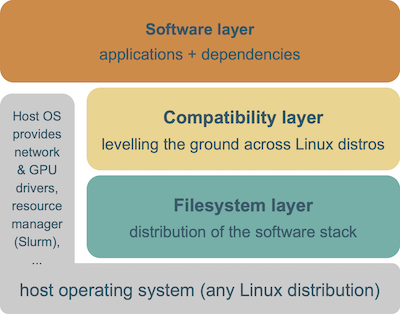
EESSI is available on several of the EuroHPC JU systems including Karolina, Vega, Deucalion ARM and GPU partitions, and MareNostrum 5. For a full list see Systems where EESSI is available.
Once installed by your site admin, EESSI is nearly trivial to use:
Check that EESSI is available.
ls /cvmfs/software.eessi.ioshould show:
defaults host_injections init README.eessi versionsand then:
source /cvmfs/software.eessi.io/versions/2023.06/init/bashgiving (abbreviated):
Found EESSI repo @ /cvmfs/software.eessi.io/versions/2023.06!
archdetect says x86_64/amd/zen2
archdetect could not detect any accelerators
Using x86_64/amd/zen2 as software subdirectory.
...
Prepending site path /cvmfs/software.eessi.io/host_injections/2023.06/software/linux/x86_64/amd/zen2/modules/all to $MODULEPATH...
Environment set up to use EESSI (2023.06), have fun!
then load the module for e.g. DOLFINx Python:
module load FEniCS-DOLFINx-Python/0.9.0-foss-2023band run:
mpiexec python -c "from mpi4py import MPI; import dolfinx" Some rough edges
I encountered a known rough edges related to MPI in the EESSI 2023.06 set on the aion cluster at ULHPC in mid-2026. This point link back to the guidance “always using the system-provided MPI” - as EESSI provides a full binary stack, it does not follow this maxim.
A known issue when using
mpirunleading to the failure:
Failed to modify UD QP to INIT on mlx5_0: Operation not permittedIt is possible to fix this by instructing OpenMPI to not use libfabric and turn off UCX’s uct transport:
mpiexec -mca pml ucx -mca btl '^uct,ofi' -mca mtl '^ofi'Whether libfabric or UCX provides higher performance depends on the interconnect used in your cluster.
The same fix can be extended to srun with:
OMPI_MCA_pml=ucx OMPI_MCA_btl='^uct,ofi' OMPI_MCA_mtl='^ofi' PMIX_MCA_psec=native srunThe same environment variables can of course be set in a job script using
export.
The Future? The MPI ABI Initiative.
An ABI compatibility guarantee allows software compiled against one MPI implementation (e.g. MPICH) to have it swapped out at runtime via dynamic linking (e.g. Intel MPI, Cray MPI, MVAPICH2).
The recent MPI5 ABI Initiative Hammond et al. (2023)
guarantees ABI compatibility across all MPI5-compliant implementations — in the
future it may be possible to build DOLFINx binaries (via EESSI, conda,
pypi.org, Spack etc.) and swap in any platform-tuned MPI5 library at runtime,
and presumably the use of scheduler-integrated launchers like srun too.
An extension to Spack called splicing that can explicitly reason about ABI compatibility is described in Gouwar et al. (2025) and would allow for seamless mixing of source and binary distributions.
With Spack¶

Spack can build an entire software stack, including compilers, MPI, PETSc, ADIOS2, gmsh etc. in a single shot. Particularly powerful is Spack’s concretisation algorithm which is essentially a very smart constraint solver: constraints from package definitions, already-installed specs, and the user’s request are compiled into a logical encoding, and the concretisation algorithm finds the optimal ‘concrete’ solution satisfying as many as possible.
On a cluster, the partial stack approach works well in practice: we tell Spack to reuse the scheduler-integrated and interconnect-tuned MPI along with the compiler from the module system (e.g. as provided by Easybuild), and then build everything else itself. This is what we use for most internal projects at the University of Luxembourg.
Setting up Spack¶
Spack has a very minimal dependency set and can be installed by checking the source
out using git:
cd ~
git clone --depth=2 https://github.com/spack/spack.git
source ~/spack/share/spack/setup-env.sh
The key step for a partial stack build is telling Spack which dependencies to
take from the module system rather than building them itself. On an ‘unknown’
HPC system I typically explore with module spider to find all compiler and
interconnect/MPI related components, e.g.:
module spider OpenMPI
module spider PMIx
module spider GCC
module spider compiler/GCCcore
While making notes of version numbers. I then module load all of the modules
and check for warning messages related to e.g. compatibility.
Official site support?
If your site officially supports Spack, packages.yaml may already be provided
in /etc/spack. For example, ARCHER2
Spack is already setup to use
the HPE Cray Programming Environment (Cray LibSci, Cray MPICH etc.) and has a
large repository of cached package builds to speedup user builds and reduce
storage quota use.
Then, create ~/.spack/packages.yaml with entries for each system-provided
package. The abbreviated example below is for the University of Luxembourg
aion cluster (GCC 13.2.0, OpenMPI 4.1.6, SLURM):
packages:
  gcc:
    externals:
    - spec: gcc@13.2.0+binutils languages:='c,c++,fortran'
      modules:
      - compiler/GCC/13.2.0
      extra_attributes:
        compilers:
          c: /opt/apps/easybuild/.../GCCcore/13.2.0/bin/gcc
          cxx: /opt/apps/easybuild/.../GCCcore/13.2.0/bin/g++
          fortran: /opt/apps/easybuild/.../GCCcore/13.2.0/bin/gfortran
    buildable: false
  openmpi:
    variants: fabrics=ofi,ucx schedulers=slurm
    externals:
    - spec: openmpi@4.1.6
      modules:
      - mpi/OpenMPI/4.1.6-GCC-13.2.0
    buildable: false
  mpi:
    buildable: false
  slurm:
    externals:
    - spec: slurm@23.11.10 sysconfdir=/etc/slurm
      prefix: /usr
    buildable: false
  # ... plus binutils, libevent, libfabric, hwloc, ucx, pmix, libxml2, zlib etc.
The full packages.yaml can be found
here.
Checking dynamic linking
Inspecting the full packages.yaml file you will see entries for libxml2 and
zlib. Why do we need these? The first time I tried this Spack configuration
without libxml2 and zlib, Spack chose to build zlib and libxml2.
However, libxml2 produced warnings at runtime due to OpenMPI dynamically
linking against potentially incompatible (Spack-provided) version. To avoid
this, it is good practice to inspect the linking of at least MPI and ask Spack
not to build all the lower-level dependencies as well.
module load mpi/OpenMPI/4.1.6-GCC-13.2.0
ldd $EBROOTOPENMPI/lib64/libmpi.so
gives:
linux-vdso.so.1 (0x00007fffb1bf7000)
libopen-rte.so.40 => /opt/apps/easybuild/systems/aion/rhel810-20250803/2023b/epyc/software/OpenMPI/4.1.6-GCC-13.2.0/lib/libopen-rte.so.40 (0x00007f25507ab000)
libopen-pal.so.40 => /opt/apps/easybuild/systems/aion/rhel810-20250803/2023b/epyc/software/OpenMPI/4.1.6-GCC-13.2.0/lib/libopen-pal.so.40 (0x00007f25506b9000)
librt.so.1 => /lib64/librt.so.1 (0x00007f25504b1000)
libutil.so.1 => /lib64/libutil.so.1 (0x00007f25502ad000)
libhwloc.so.15 => /opt/apps/easybuild/systems/aion/rhel810-20250803/2023b/epyc/software/hwloc/2.9.2-GCCcore-13.2.0/lib64/libhwloc.so.15 (0x00007f255024c000)
libpciaccess.so.0 => /opt/apps/easybuild/systems/aion/rhel810-20250803/2023b/epyc/software/libpciaccess/0.17-GCCcore-13.2.0/lib64/libpciaccess.so.0 (0x00007f2550240000)
libxml2.so.2 => /opt/apps/easybuild/systems/aion/rhel810-20250803/2023b/epyc/software/libxml2/2.11.5-GCCcore-13.2.0/lib64/libxml2.so.2 (0x00007f25500db000)
libdl.so.2 => /lib64/libdl.so.2 (0x00007f254fed7000)
libz.so.1 => /opt/apps/easybuild/systems/aion/rhel810-20250803/2023b/epyc/software/zlib/1.2.13-GCCcore-13.2.0/lib64/libz.so.1 (0x00007f254febc000)
liblzma.so.5 => /opt/apps/easybuild/systems/aion/rhel810-20250803/2023b/epyc/software/XZ/5.4.4-GCCcore-13.2.0/lib64/liblzma.so.5 (0x00007f254fe8d000)
libevent_core-2.1.so.7 => /opt/apps/easybuild/systems/aion/rhel810-20250803/2023b/epyc/software/libevent/2.1.12-GCCcore-13.2.0/lib64/libevent_core-2.1.so.7 (0x00007f254fe55000)
libevent_pthreads-2.1.so.7 => /opt/apps/easybuild/systems/aion/rhel810-20250803/2023b/epyc/software/libevent/2.1.12-GCCcore-13.2.0/lib64/libevent_pthreads-2.1.so.7 (0x00007f254fe50000)
libm.so.6 => /lib64/libm.so.6 (0x00007f254face000)
libpthread.so.0 => /lib64/libpthread.so.0 (0x00007f254f8ae000)
libc.so.6 => /lib64/libc.so.6 (0x00007f254f4d7000)
/lib64/ld-linux-x86-64.so.2 (0x00007f255076b000)
While writing this tutorial, I realised I should probably also add xz to the
packages.yaml file too.
Building FEniCS¶
I will now walk through the process of building DOLFINx C++ 0.10 on Ubuntu 24.04 using MPICH and GCC provided by the system packages - this (somewhat) approximates the experience of doing this on an HPC, although it is not necessary to deal with the HPC modules system in Ubuntu.
Begin by launching a Ubuntu 24.04-based Spack container. This has spack
preinstalled.
docker run -ti --rm spack/ubuntu-noble:develop All subsequent commands are run inside the container.
Then install libmpich-dev (and nano!) from Ubuntu packages with apt:
apt update
apt install libmpich-dev nano
We now need to setup Spack to use the system MPICH. This can be done by editing
~/spack/packages.yaml which will already contain information about how to use
the system-provided GCC:
packages:
  gcc:
    externals:
    - spec: gcc@13.3.0 languages:='c,c++,fortran'
      prefix: /usr
      extra_attributes:
        compilers:
          c: /usr/bin/gcc
          cxx: /usr/bin/g++
          fortran: /usr/bin/gfortran
Finding compilers on an HPC
On an HPC system, it is normally possible to load a compiler related module and
then use spack compiler find to automatically complete packages.yaml, e.g.:
module load compiler/GCC/13.2.0
spack compiler find
After running spack compiler find I recommend removing compilers that you
don’t want to use - often ancient GCC versions distributed by RedHat are
detected, for example.
~/.spack/packages.yaml can be modified to contain:
packages:
  gcc:
    externals:
    - spec: gcc@13.3.0 languages:='c,c++,fortran'
      prefix: /usr
      extra_attributes:
        compilers:
          c: /usr/bin/gcc
          cxx: /usr/bin/g++
          fortran: /usr/bin/gfortran
  # This is quite minimal - could also add hwloc, ucx, pmix etc.
  mpich:
    variants: netmod=ucx device=ch4 pmi=pmix
    externals:
    - spec: mpich@4.2.0+fortran
      prefix: /usr
    buildable: false
  mpi:
    buildable: false
We create an isolated Spack environment and ask Spack to add DOLFINx C++ 0.10 to its spec (specification):
spack env create -d ~/fenicsx-env/
spack env activate ~/fenicsx-env/
spack add fenics-dolfinx@0.10
DOLFINx Python and useful dependencies
The above example is a very minimal install - something more useful might be:
spack add py-fenics-dolfinx@0.10+petsc4py ^fenics-dolfinx+adios2 ^petsc+mumps+hypre ^adios2+python
spack add gmsh+opencascade
We can then concretize the spec and inspect the output
spack concretizegives:
 -   6l4eiqq  fenics-dolfinx@0.10.0.post4~adios2~ipo~petsc~slepc build_system=cmake build_type=RelWithDebInfo generator=make partitioners:=parmetis platform=linux os=ubuntu24.04 target=aarch64 %c,cxx=gcc@13.3.0
 -   p2nn264      ^boost@1.90.0~atomic~charconv~chrono~clanglibcpp~container~context~contract~conversion~date_time~debug~exception~fiber~filesystem~graph~graph_parallel~icu~iostreams~json~locale~log~math~mpi~mqtt5+multithreaded~nowide~numpy~openmethod~pic~program_options~python~random~regex~serialization+shared~signals2~singlethreaded~stacktrace~system~taggedlayout~test~thread~timer~type_erasure~url~versionedlayout~wave build_system=generic cxxstd=11 patches:=a440f96 visibility=hidden platform=linux os=ubuntu24.04 target=aarch64 %c,cxx=gcc@13.3.0
 -   fq22rga      ^cmake@3.31.11~doc+ncurses+ownlibs~qtgui build_system=generic build_type=Release platform=linux os=ubuntu24.04 target=aarch64 %c,cxx=gcc@13.3.0
 -   wxv5vhz          ^curl@8.20.0~gssapi~ldap~libidn2~librtmp~libssh~libssh2+nghttp2 build_system=autotools libs:=shared,static tls:=openssl platform=linux os=ubuntu24.04 target=aarch64 %c,cxx=gcc@13.3.0
 -   exfoem5              ^nghttp2@1.67.1 build_system=autotools platform=linux os=ubuntu24.04 target=aarch64 %c,cxx=gcc@13.3.0
 -   amzmsz3              ^openssl@3.6.1~docs+shared build_system=generic certs=mozilla platform=linux os=ubuntu24.04 target=aarch64 %c,cxx=gcc@13.3.0
 -   d7ca4nc                  ^ca-certificates-mozilla@2026-03-19 build_system=generic platform=linux os=ubuntu24.04 target=aarch64
 -   lyw4g2i                  ^perl@5.42.0+cpanm+opcode+open+shared+threads build_system=generic platform=linux os=ubuntu24.04 target=aarch64 %c=gcc@13.3.0
 -   ovpkjrj                      ^berkeley-db@18.1.40+cxx~docs+stl build_system=autotools patches:=26090f4,b231fcc platform=linux os=ubuntu24.04 target=aarch64 %c,cxx=gcc@13.3.0
 -   zfz2pgv                      ^gdbm@1.26 build_system=autotools platform=linux os=ubuntu24.04 target=aarch64 %c=gcc@13.3.0
 -   xs4t3x2                          ^readline@8.3 build_system=autotools patches:=21f0a03 platform=linux os=ubuntu24.04 target=aarch64 %c=gcc@13.3.0
 -   2hvpi2y                      ^less@692 build_system=autotools platform=linux os=ubuntu24.04 target=aarch64 %c=gcc@13.3.0
 -   xfbth5w          ^ncurses@6.6~symlinks+termlib abi=none build_system=autotools patches:=7a351bc platform=linux os=ubuntu24.04 target=aarch64 %c,cxx=gcc@13.3.0
 -   zpbobzc          ^zlib-ng@2.3.3+compat+new_strategies+opt+pic+shared build_system=autotools platform=linux os=ubuntu24.04 target=aarch64 %c,cxx=gcc@13.3.0
 -   6zpo3h7      ^compiler-wrapper@1.1.0 build_system=generic platform=linux os=ubuntu24.04 target=aarch64
 -   u2pmqun      ^fenics-basix@0.10.0.post0~ipo build_system=cmake build_type=RelWithDebInfo generator=make platform=linux os=ubuntu24.04 target=aarch64 %cxx=gcc@13.3.0
 -   x4ipjkj          ^openblas@0.3.33~bignuma~consistent_fpcsr+dynamic_dispatch+fortran~ilp64+locking+pic+shared~static build_system=makefile patches:=723ddc1 symbol_suffix=none threads=none platform=linux os=ubuntu24.04 target=aarch64 %c,cxx,fortran=gcc@13.3.0
 -   qqjkyda      ^fenics-ufcx@0.10.0~ipo build_system=cmake build_type=Release generator=make platform=linux os=ubuntu24.04 target=aarch64 %c=gcc@13.3.0
[e]  23jct2d      ^gcc@13.3.0+binutils+bootstrap~graphite+libsanitizer~mold~nvptx~piclibs~profiled~strip build_system=autotools build_type=RelWithDebInfo languages:='c,c++,fortran' platform=linux os=ubuntu24.04 target=aarch64
 -   4jxqg6q      ^gcc-runtime@13.3.0 build_system=generic platform=linux os=ubuntu24.04 target=aarch64
[e]  wqjtbsv      ^glibc@2.39 build_system=autotools platform=linux os=ubuntu24.04 target=aarch64
 -   vjzdhhz      ^gmake@4.4.1~guile build_system=generic platform=linux os=ubuntu24.04 target=aarch64 %c=gcc@13.3.0
 -   nwt5azx      ^hdf5@1.14.6~cxx~fortran~hl~ipo~java~map+mpi+shared~subfiling~szip~threadsafe+tools api=default build_system=cmake build_type=Release generator=make platform=linux os=ubuntu24.04 target=aarch64 %c=gcc@13.3.0
[e]  wdv3m6g      ^mpich@4.2.0~argobots~cuda+fortran+hwloc+hydra~level_zero+libxml2+pci~rocm+romio~slurm~vci~verbs+wrapperrpath~xpmem build_system=autotools datatype-engine=auto device=ch4 netmod=ofi pmi=default platform=linux os=ubuntu24.04 target=aarch64
 -   fa3jylq      ^parmetis@4.0.3~gdb~int64~ipo+shared build_system=cmake build_type=Release generator=make patches:=4f89253,50ed208,704b84f platform=linux os=ubuntu24.04 target=aarch64 %c,cxx=gcc@13.3.0
 -   p5yxbwj          ^metis@5.1.0~gdb~int64~ipo~no_warning~real64+shared build_system=cmake build_type=Release generator=make patches:=4991da9,93a7903,b1225da platform=linux os=ubuntu24.04 target=aarch64 %c,cxx=gcc@13.3.0
 -   pvvyxwe      ^pkgconf@2.5.1 build_system=autotools platform=linux os=ubuntu24.04 target=aarch64 %c=gcc@13.3.0
 -   jvnxyfr          ^gnuconfig@2025-07-10 build_system=generic platform=linux os=ubuntu24.04 target=aarch64
 -   zhao4o3      ^pugixml@1.15~ipo+pic+shared build_system=cmake build_type=Release generator=make platform=linux os=ubuntu24.04 target=aarch64 %c,cxx=gcc@13.3.0
 -   uayylpc      ^scotch@7.0.11+compression~esmumps+fortran~int64~ipo~metis+mpi~mpi_thread~noarch+shared+threads build_system=cmake build_type=Release determinism=FIXED_SEED generator=make platform=linux os=ubuntu24.04 target=aarch64 %c,cxx,fortran=gcc@13.3.0
 -   j6glmqg          ^bison@3.8.2~color build_system=autotools platform=linux os=ubuntu24.04 target=aarch64 %c,cxx=gcc@13.3.0
 -   5mu32rv              ^diffutils@3.12 build_system=autotools platform=linux os=ubuntu24.04 target=aarch64 %c=gcc@13.3.0
 -   p3s4r7r                  ^libiconv@1.18 build_system=autotools libs:=shared,static platform=linux os=ubuntu24.04 target=aarch64 %c=gcc@13.3.0
 -   gja25k4              ^m4@1.4.21+sigsegv build_system=autotools platform=linux os=ubuntu24.04 target=aarch64 %c,cxx=gcc@13.3.0
 -   kbxeckq                  ^libsigsegv@2.15 build_system=autotools platform=linux os=ubuntu24.04 target=aarch64 %c=gcc@13.3.0
 -   x57xudo          ^flex@2.6.4+lex~nls build_system=autotools patches:=f8b85a0 platform=linux os=ubuntu24.04 target=aarch64 %c,cxx=gcc@13.3.0
 -   atrwke6              ^autoconf@2.72 build_system=autotools platform=linux os=ubuntu24.04 target=aarch64
 -   2pmdyb6              ^automake@1.18.1 build_system=autotools platform=linux os=ubuntu24.04 target=aarch64 %c=gcc@13.3.0
 -   qrm6ttv              ^findutils@4.10.0 build_system=autotools patches:=440b954 platform=linux os=ubuntu24.04 target=aarch64 %c=gcc@13.3.0
 -   ytycm3s              ^gettext@1.0+bzip2+curses+git~libunistring+libxml2+pic+shared+tar+xz build_system=autotools platform=linux os=ubuntu24.04 target=aarch64 %c,cxx=gcc@13.3.0
 -   hvoozan                  ^bzip2@1.0.8~debug~pic+shared build_system=generic platform=linux os=ubuntu24.04 target=aarch64 %c=gcc@13.3.0
 -   trlqzm2                  ^libxml2@2.15.3+pic~python+shared build_system=autotools platform=linux os=ubuntu24.04 target=aarch64 %c=gcc@13.3.0
 -   v5ossow                  ^tar@1.35 build_system=autotools zip=pigz platform=linux os=ubuntu24.04 target=aarch64 %c=gcc@13.3.0
 -   gy44cjn                      ^pigz@2.8 build_system=makefile platform=linux os=ubuntu24.04 target=aarch64 %c=gcc@13.3.0
 -   elrdemo                      ^zstd@1.5.7+programs build_system=makefile compression:=none libs:=shared,static platform=linux os=ubuntu24.04 target=aarch64 %c,cxx=gcc@13.3.0
 -   qao34e6                  ^xz@5.8.3~pic build_system=autotools libs:=shared,static platform=linux os=ubuntu24.04 target=aarch64 %c=gcc@13.3.0
 -   rwwo32e              ^help2man@1.49.3 build_system=autotools platform=linux os=ubuntu24.04 target=aarch64 %c=gcc@13.3.0
 -   ttxrt6k              ^libtool@2.5.4 build_system=autotools platform=linux os=ubuntu24.04 target=aarch64 %c=gcc@13.3.0
 -   heqsdot                  ^file@5.46+static build_system=autotools platform=linux os=ubuntu24.04 target=aarch64 %c=gcc@13.3.0
 -   ewp6ngh      ^spdlog@1.16.0~ipo+shared build_system=cmake build_type=Release cxxstd=14 generator=make patches:=fdc325d platform=linux os=ubuntu24.04 target=aarch64 %cxx=gcc@13.3.0
 -   nncmdbb          ^fmt@12.1.0~ipo+pic~shared build_system=cmake build_type=Release cxxstd=11 generator=make platform=linux os=ubuntu24.04 target=aarch64 %c,cxx=gcc@13.3.0
Here the [e] denotes a system provided package, and [-] denotes a package
that will be built. Spack caches packages intelligently - if a package had
already been built it would have [+] at the side.
If we are happy with the concretization, we can proceed with:
spack installwhich can take around 30 minutes. On a bigger machine parallel jobs are
possible with spack install -p2 -j4 for e.g. 2 package builds with 4 build
processes per package.
Runtime configuration¶
Two of the most common and impactful runtime performance problems when using DOLFINx on HPC systems are caused not by the numerical computation itself, but by disk access patterns during program startup and just-in-time compilation (JIT). HPC storage systems are optimised for high aggregate throughput on large sequential reads and writes - the kind generated by DOLFINx parallel IO using such as HDF5 or ADIOS2. However, they perform poorly under workloads that issue many small, random, or metadata-heavy operations, which is precisely the access pattern generated when Python initialises and loads modules, and when DOLFINx/FFCx performs just-in-time compilation, or cache reads, of finite element kernels.
The Python import problem¶
The performance issues related to Python initialising and loading modules on
HPC has become infamous enough to warrant a specific name: “The Python import
problem”. In fact, the issue is not specific to Python, and has been observed on
very large MPI runs (10000+ MPI ranks) using compiled C/C++/Fortran
applications as well.
Avoid the problem?¶
The first piece of advice is to try and avoid the problem! Put all FEniCS
installation files, for example $SPACK_HOME, on the most performant HPC
storage system for small file accesses - this is typically $HOME, not
$SCRATCH.
Then run a very simple script on an geometrically increasing number of nodes, up to the maximum number needed for your analysis, e.g.:
#!/bin/bash -l
# SBATCH directives

# Initialisation

SCRIPT_START=$(date +%s)
srun python -c "from mpi4py import MPI; import dolfinx"
SCRIPT_END=$(date +%s)
SCRIPT_ELAPSED=$(( SCRIPT_END - SCRIPT_START ))

echo "Script elapsed (seconds): ${SCRIPT_ELAPSED}"
In short, if you start to see a huge blow up (minutes, or even hanging jobs) in
$SCRIPT_ELAPSED, you likely have the Python import problem. If everything
looks OK, then no solution is needed.
Containers¶
Containers (e.g. Apptainer.py and .so
files. This dramatically reduces the metadata load on the parallel filesystem
and, in practice, eliminates the import problem even at large node counts.
This was demonstrated in Hale et al. (2017) using
the Shifter runtime, and this applies to the more
common Apptainer
Spindle¶
Spindle replaces the dynamic linker and
Python import machinery at runtime with an MPI-aware load. When one MPI rank
reads a shared library or Python module for the first time, Spindle broadcasts
the file contents to all other ranks over MPI. All subsequent ranks satisfy the
request from a local cache (default $TMPDIR). The net effect is that each
file is read from a parallel filesystem exactly once per job, regardless of
node count, which eliminates the per-rank metadata request that causes the
import problem. Spindle requires no changes to the application or the
installation and it is easily invoked by prepending spindle to the usual
srun command within a SLURM batch script:
spindle srun python my_fenicsx_script.pySpindle can be installed using Spack or from source, and does not require special permissions. We have used it with success to execute jobs with 10000s of MPI ranks and it is essentially transparent.
JIT compilation¶
Performance¶
Each time DOLFINx encounters a new variational form, FFCx compiles it to a
shared library and writes it to a cache directory (default ~/.cache/fenics or
$XDG_CACHE_HOME if set). On HPC systems, simultaneous JIT cache reads and
writes from thousands of ranks cause the same filesystem pressure as the
import problem.
DOLFINx mitigates this, to an extent, via the mpi_jit_decorator keyword
argument to the JIT compilation functions e.g. dolfinx.fem.form: rank 0
compiles the form and writes to the cache; all other ranks block on an MPI
broadcast, which rank 0 unblocks when it succeeds with compilation. So when
using mpi_jit_decorator=MPI_COMM_WORLD, the default, each form is compiled
once per job regardless of the size.
However, the cache read on the non-root ranks still touches the parallel
filesystem. To fix this, it is possible to point the cache at a node-local path
such as an SSD-backed $TMPDIR:
export XDG_CACHE_HOME=$TMPDIR/$USER/fenics-cache-$SLURM_JOB_IDand performing the JIT-compilation + cache lookup on a communicator split
along the shared memory boundaries (i.e. one communicator per node) which
also defines the boundary of $TMPDIR:
...
a = ufl.inner(u, v)*ufl.dx
shared_mem_comm = MPI.COMM_WORLD.Split_type(MPI.COMM_TYPE_SHARED, key=MPI.COMM_WORLD.rank)
a_dolfinx = form(a, jit_comm=shared_mem_comm)
This approach solves the parallel file system bottleneck, at the expense of
requiring JIT compilation on every node within a job, and on every job start,
as $TMPDIR is usually cleaned by the scheduler on job exit.
Compiler optimisation flags¶
Easybuild and Spack will compile Basix and DOLFINx with ‘good enough’
system-specific compiler flags (-march,-mtune, -Ox etc.) and we do not
recommend tweaking them further - in our experience further optimisations make
little further difference to runtime performance.
However, it can be worthwhile to play with the compiler flags for the FFCx JIT
compiled code. At the minimum we recommend setting the contents of
~/.config/dolfinx/dolfinx_jit_options.json to:
echo '{ "cffi_extra_compile_args": ["-march=native", "-O3" ] }' > ~/.config/dolfinx/dolfinx_jit_options.jsonThe -ffast-math flag, which enables non-IEEE compliant floating point
operations, is also worth experimenting with, but can cause correctness issues.
Also remember to set -mtune=native in addition to -march=native when building on
ARM.
Testing and benchmarking¶
FEniCS unit tests¶
We recommend executing the DOLFINx unit tests on your HPC system before using any installation. As of mid-2026, it is (unfortunately) necessary to manually install test dependencies, and then execute the tests by checking out the DOLFINx source code.
We are currently in the process of integrating the execution of FEniCS unit tests and sanity checks into Easybuild (see § With Easybuild) and Spack (see § With Spack) package recipes - this will allow the test suites to be executed automatically.
FEniCS performance tests¶
The Performance test codes for FEniCSx/DOLFINx provide two C++ PETSc-based elliptic solvers (Poisson, Elasticity) that can be used to test the parallel scalability and performance of DOLFINx and by extension, PETSc.
We recommend running the Poisson problem in a weak scaling test from 1 through 8 nodes at 50% core utilisation per node (i.e., undersubscription). If you plan on running larger problems, you will of course need to test with more nodes.
Since 2024, the nightly performance test data on Cambridge CSD3 HPC has not been updated.
Building and running¶
At the time of writing the FEniCSx 0.11 Spack packages are not merged into the upstream Spack package repo, so I used the FEniCS Spack packages overlay repository to get the latest packages.
I created a Spack environment in ~/fenicsx-0.11-flags from the following
spack.yaml file:
spack:
  specs:
  - >-
    fenics-dolfinx@0.11+adios2+superlu-dist+petsc
    partitioners=parmetis
    ^petsc+mumps+hypre+superlu-dist+int64~fortran-bindings
    ^boost+program_options
  - py-fenics-ffcx@0.11
  packages:
    petsc:
      require:
        - cflags="-O3 -march=native -mtune=native"
        - cxxflags="-O3 -march=native -mtune=native"
        - fflags="-O3 -march=native -mtune=native"
  view: true
  concretizer:
    unify: true
The Spack spec syntax is covered in full
here. We build
fenics-dolfinx@0.11 with ADIOS2 (+adios2), SuperLU-DIST (+superlu-dist),
and PETSc (+petsc) support, using ParMETIS as the graph partitioner
(partitioners=parmetis); link it against a PETSc built with MUMPS, Hypre,
SuperLU-DIST, and 64-bit integers but without Fortran bindings
(^petsc+mumps+hypre+superlu-dist+int64~fortran-bindings), and against a Boost
built with the program_options component (^boost+program_options).
PETSc has rather conservative default compiler flags so it is worth making them more aggressive.
Once the Spack environment is built it should be possible to build the DOLFINx performance tests:
module load compiler/GCC
module load mpi/OpenMPI
spack load cmake

git clone https://github.com/fenics/performance-test
cd performance-test
cmake -B build-dir/ -S src/
cmake --build build-dir/
which will produce a binary build-dir/dolfinx-scaling-test that can be
executed using e.g.:
srun -n 8 ./build-dir/dolfinx-scaling-test \
  --problem_type poisson \
  --scaling_type weak \
  --ndofs 500000 \
  -log_view \
  -ksp_view \
  -ksp_type cg \
  -ksp_rtol 1.0e-8 \
  -pc_type hypre \
  -pc_hypre_type boomeramg \
  -pc_hypre_boomeramg_strong_threshold 0.7 \
  -pc_hypre_boomeramg_agg_nl 4 \
  -pc_hypre_boomeramg_agg_num_paths 2 \
  -options_left
Weak scaling test¶
To execute a weak scaling test we typically execute an outer script on the login node:
#!/bin/bash -l
sbatch -N 1 poisson.sh
sbatch -N 2 poisson.sh
sbatch -N 4 poisson.sh
sbatch -N 8 poisson.sh
# etc., or in a bash loop
which executes an inner SLURM batch script poisson.sh:
#!/bin/bash -l
#SBATCH -J poisson-weak-scaling
#SBATCH -p batch
#SBATCH --qos=normal
#SBATCH --time=0-00:03:00
#SBATCH --ntasks-per-socket=8
#SBATCH --ntasks-per-node=64
#SBATCH --mem=0
#SBATCH -c 1
#SBATCH --exclusive

echo "== Starting run at $(date)"
echo "== Job name: ${SLURM_JOB_NAME}"
echo "== Job ID: ${SLURM_JOBID}"
echo "== Node list: ${SLURM_NODELIST}"
echo "== Submit dir: ${SLURM_SUBMIT_DIR}"
echo "== Number of tasks: ${SLURM_NTASKS}"

source ~/spack/share/spack/setup-env.sh
spack env activate ~/fenicsx-0.11-flags

cd $SLURM_SUBMIT_DIR
srun --cpu-bind=socket -v ./build-dir/dolfinx-scaling-test \
  --problem_type poisson \
  --scaling_type weak \
  --ndofs 500000 \
  -log_view \
  -ksp_view \
  -ksp_type cg \
  -ksp_rtol 1.0e-8 \
  -pc_type hypre \
  -pc_hypre_type boomeramg \
  -pc_hypre_boomeramg_strong_threshold 0.7 \
  -pc_hypre_boomeramg_agg_nl 4 \
  -pc_hypre_boomeramg_agg_num_paths 2 \
  -options_left

echo "== Finished at $(date)"
The README.md gives detailed instructions on interpreting the output which will be written to the job log files.
Aion specifics
This low-order Poisson problem is inherently memory-bandwidth and communication limited, so understanding your systems memory access layout is critical for good performance.
The Aion cluster has two physical sockets each containing a physical processor with 64 cores. However, each node is setup in a NUMA configuration with 16 NUMA domains per node, or 8 cores per domain. From previous performance tests we also know that memory bandwidth saturates at around 50% core usage.
By specifying:
#SBATCH --ntasks-per-socket=8
#SBATCH --ntasks-per-node=64
we can ensure that the 64 tasks (50% utilisation) are spread evenly across the NUMA domains (aka ‘sockets’) of each node.
I also bind MPI processes to sockets (aka ‘NUMA domains’) to guarantee that they do not jump between sockets, which can lead to potentially costly memory access patterns.
srun --cpu-bind=socket ...In this repository I have included raw data from a run from DOLFINx 0.11 built with Spack on the Aion cluster using the above scripts. I include a short section of the output here for 8 nodes with around 250 million degrees of freedom:
[MPI_MAX] Summary of timings (s)                                            |  reps        avg        tot
---------------------------------------------------------------------------------------------------------
...
ZZZ Assemble                                                                |     1   5.599968   5.599968
ZZZ Assemble matrix                                                         |     1   2.323605   2.323605
ZZZ Assemble vector                                                         |     1   0.354125   0.354125
ZZZ Create Mesh                                                             |     1  30.379810  30.379810
ZZZ Create RHS function                                                     |     1   1.148998   1.148998
ZZZ Create boundary conditions                                              |     1   0.094545   0.094545
ZZZ Create facets and facet->cell connectivity                              |     1   6.248711   6.248711
ZZZ FunctionSpace                                                           |     1   0.396796   0.396796
ZZZ Solve                                                                   |     1  10.316947  10.316947
...
and 64 nodes with around 2 billion degrees of freedom:
[MPI_MAX] Summary of timings (s)                                            |  reps        avg        tot
---------------------------------------------------------------------------------------------------------
...
ZZZ Assemble                                                                |     1   6.007643   6.007643
ZZZ Assemble matrix                                                         |     1   2.567641   2.567641
ZZZ Assemble vector                                                         |     1   0.363851   0.363851
ZZZ Create Mesh                                                             |     1  35.942877  35.942877
ZZZ Create RHS function                                                     |     1   1.148408   1.148408
ZZZ Create boundary conditions                                              |     1   0.105831   0.105831
ZZZ Create facets and facet->cell connectivity                              |     1   6.566935   6.566935
ZZZ FunctionSpace                                                           |     1   0.478330   0.478330
ZZZ Solve                                                                   |     1  12.945407  12.945407
...
The raw job outputs for varying numbers of nodes up to 160 are available in
this repository in session2/weak-scaling.
On a reasonably modern cluster you should see comparable (same order of magnitude) absolute timings. You should be looking for approximately constant times for the DOLFINx assembly and PETSc solve stages with increasing node count (weak scaling). It is common to see a slight deterioration in scaling going from 1 node to 2 nodes due to the move from shared memory to interconnect-based MPI communication.
My results also show a sudden drop in scalability in the Hypre/BoomerAMG
preconditioner application at 96 nodes (slurm-13009006.out). Switching to
Intel MPI fixed this issue.
Closing thoughts¶
The third hardest thing in scientific computing is installing software on someone else’s computer. Jack S. Hale, FEniCS Conference 2026.
I think it’s fair to say that installing scientific software has got a lot easier since 2005! Particularly impactful has been an increased emphasis on scientific software quality (including cross-platform installation and unit testing), standardisation efforts, and excellent HPC-specific build tooling. These tools have also allowed HPC administrators to ship a better set of modules and for initiatives for cross-cluster standardisation, like EESSI and ‘yearly software sets’, to flourish.
That said, the HPC software and hardware landscape is also becoming more difficult - users have increasingly complex demands (e.g. runtime combinations of complex software, e.g. DOLFINx and PyTorch on increasingly heterogeneous hardware (ARM, NVIDIA, AMD etc.)), to the point where ‘building most things from source’ may become unviable.
Credits¶
My thanks to the following people for their many days/weeks/months fiddling with FEniCS on HPC systems over the past decade or so:
Martin Řehoř (former UL, Rafinex Sarl)
Raphaël Bulle (former UL, INRIA: poster on -FEM on today)
Andrey Latyshev (UL, Sorbonne Université, co-organiser)
Thomas Lavigne (former UL, École Polytechnique, talk on Thursday)
Georgios Kafanas (UL, talk on EasyBuild/EESSI today)
Jahid Hassan (UL, contributor to Easybuild/EESSI talk today)
Chris Richardson (Cambridge University, poster and software demo today)
Sona Salehian Ghamsari (former UL)
whose shared knowledge has made this guide possible.
AI use statement¶
The document draft was written without AI. Claude Sonnet 4.6 was used for proof-reading, suggestions on improving the flow, and adding some visual elements (logos etc.).
- Hammond, J., Dalcin, L., Schnetter, E., PéRache, M., Besnard, J.-B., Brown, J., Gadeschi, G. B., Byrne, S., Schuchart, J., & Zhou, H. (2023). MPI Application Binary Interface Standardization. Proceedings of the 30th European MPI Users’ Group Meeting, 1–12. 10.1145/3615318.3615319
- Gouwar, J., Becker, G., Dahlgren, T., Hanford, N., Guha, A., & Gamblin, T. (2025). Bridging the Gap Between Binary and Source Based Package Management in Spack. Proceedings of the International Conference for High Performance Computing, Networking, Storage and Analysis, 556–569. 10.1145/3712285.3759791
- Hale, J. S., Li, L., Richardson, C. N., & Wells, G. N. (2017). Containers for Portable, Productive, and Performant Scientific Computing. Computing in Science & Engineering, 19(6), 40–50. 10.1109/mcse.2017.2421459